AeroXC – Flying Forecast
- 4.7
- Rating
- 10.00K
- Installs
- Free
- Price

 Analysis by App-foxy
I approached AeroXC – Flying Forecast as a weather tool for pilots rather than as another general-purpose app that happens to show rain and temperature. Its focus is much narrower: it brings wind by altitude, thermal information, and vertical profiles into a mobile format. That immediately makes it more interesting for paragliding, hang-gliding, soaring, and other flying decisions, but also less useful if all you want is a simple answer to “Will it rain this afternoon?”
In my experience, the app makes the most sense when I am already thinking in terms of layers of air instead of only ground-level conditions. A calm launch site can still lead to a very different flight once the wind changes higher up, and a forecast that looks acceptable at the surface may become less attractive when thermals or the vertical wind picture are considered. That is the practical reason to look at this app: it encourages a more complete reading of the atmosphere before committing to a flight.
It is a free weather app from Matu, rated 4.7 on average from around 688 ratings, with over 10K installs. Those figures suggest a focused audience has found value in it, even though it is not presented as a mainstream weather replacement. The content rating is Everyone, and the app is currently listed as version Lijak 8.017 for devices using OS 10 or later. Optional in-app purchases range from $0.99 to $21.26 per item, so I would check the purchase screen carefully before treating the free download as the complete experience.
You May Also Like

 Blood Strike: 2.5 Anniversary
Blood Strike’s Loadouts Turn Every Drop Into a Tactical Gamble
A close look at Blood Strike’s custom loadouts: how fast access to signature weapons reshapes its battle royale rhythm, rewards preparation, and narrows the gap between fights.

 Pandora - Music & Podcasts
Pandora’s Music Is Easy to Start, but Harder to Recover
Pandora’s strength is its low-effort path from a seed to a station. Its weak spot is how much confidence it asks you to place in connection, setup, and quiet recovery.

 8 Ball Pool
 Is Built on Rivalries, Rematches, and Routine
A close look at the rivalries, rematches, shared routines, and unanswered safety questions that turn a quick pool match into a persistent mobile community.

 Samsung Music
’s Quiet Strength Is Playing What You Already Own
Its reach comes less from spectacle than from dependable access to a personal library. That simplicity is both the app’s strongest retention engine and its ceiling.

 AccuWeather: Weather Radar
AccuWeather Review: A Quick, Clear Forecast for Everyday Decisions
For everyday plans, the best forecast is the one you can understand quickly. AccuWeather makes rain timing, radar, and local conditions easy to act on, with a few trade-offs.

 Hill Climb Racing
Why Hill Climb Racing Still Turns Crashes Into One More Run
A tiny car, a bumpy hill and one more upgrade: Hill Climb Racing keeps resurfacing because its simple chaos makes every near-miss feel personal.
More From Our News Desk
View All News


How AeroXC handles a connected flying forecast
I find the most useful way to approach a connected flying forecast is to decide what I need to learn before opening it: how wind changes with altitude, what the thermal picture suggests, and whether the broader profile fits the plan. That keeps a detailed screen from becoming a collection of interesting but disconnected signals. Once those questions are clear, it becomes easier to carry the forecast into a site check and judge whether reality agrees.
The useful moment is before the flight, not during a blind check
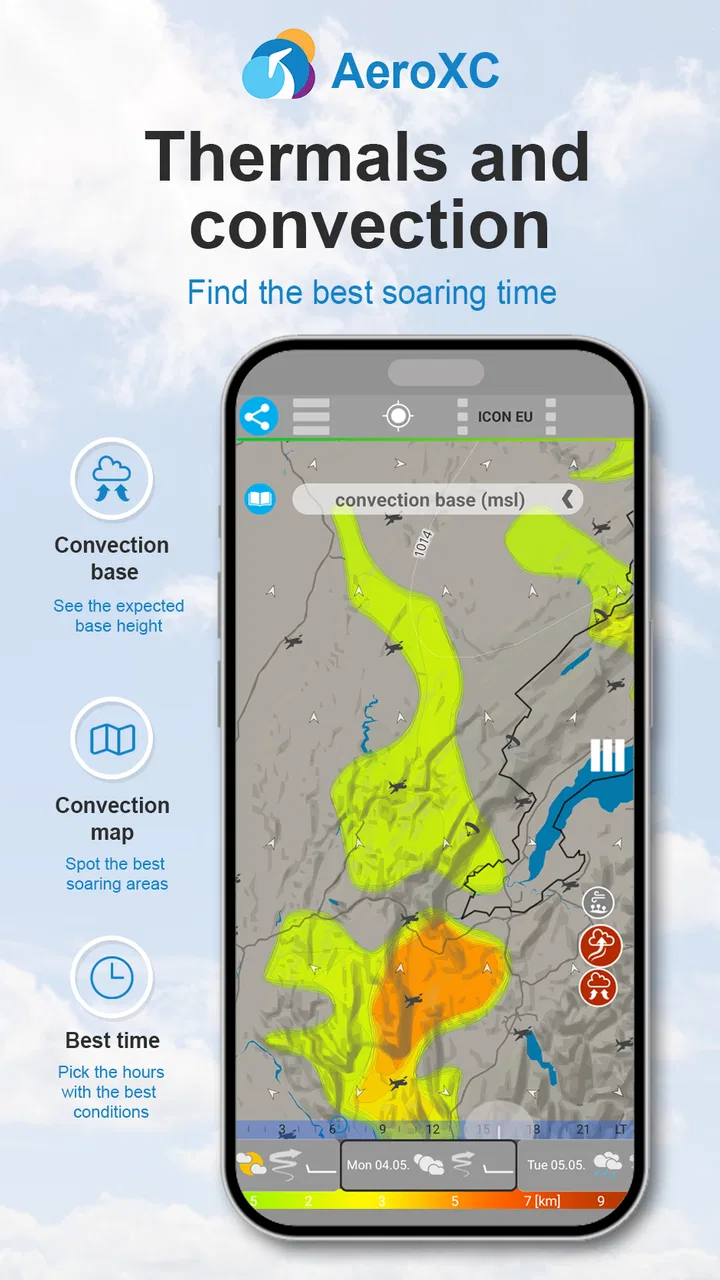
The strongest part of the experience is the planning stage, when I have a reliable connection and enough time to compare the different atmospheric views. Wind by altitude is more useful than a single wind arrow when the proposed flight depends on how conditions evolve above the launch area. The vertical profile adds another layer of context, while the thermal view can help me think about whether the day may offer workable rising air rather than merely acceptable surface weather.
That combination changes how I read a forecast. Instead of asking only whether the weather looks pleasant, I can ask whether the air is likely to behave consistently through the part of the atmosphere that matters for my activity. This is a non-obvious strength because many ordinary weather apps are designed around walking, commuting, gardening, or outdoor plans at ground level. They may be excellent for rain timing and temperature, but they do not naturally encourage this altitude-based decision process.
Connectivity matters here because the app’s value depends on being able to obtain and inspect forecast information when I need it. I would not treat a last-minute screen refresh at the launch site as my whole briefing. A better habit is to open the app at home or somewhere with dependable service, examine the forecast, and make notes about the important changes. That workflow reduces the chance that a weak signal or busy network will become part of the safety decision.
I also like the idea of checking the forecast more than once rather than accepting the first view as a fixed promise. Weather information is a planning aid, not a guarantee, and altitude-sensitive flying makes that distinction especially important. A forecast that looked encouraging earlier can deserve a second look closer to departure. The app is most useful when it supports that comparison, not when it is treated as an authority that removes the need for observation and judgement.
Why a phone screen can be both helpful and limiting
AeroXC is built around information that can be difficult to digest in a quick glance. On a phone, the convenience is obvious: I can review the atmospheric picture without carrying a separate computer into every planning situation. That is particularly handy when travelling to a new area, checking conditions before leaving accommodation, or comparing a planned launch with an alternative location while I still have time to change plans.
The trade-off is that detailed weather information needs attention. Small screens can make profiles, altitude changes, and forecast transitions harder to interpret than they would be on a larger display. I would rather study the app while stationary than attempt to decode a complicated picture while preparing equipment or moving around a launch area. This is not a flaw unique to this app; it is a practical limitation of putting specialist weather information on a pocket-sized device.
For a beginner, the app may feel more demanding than a conventional forecast. Terms and visual patterns related to thermals, wind layers, and vertical profiles require some understanding of flying weather. That does not make it unsuitable for learning, but I would not expect it to teach the fundamentals by itself. Someone new to the sport should use it alongside instruction and local knowledge, not as a substitute for either.
For an experienced pilot, the compact format can be a genuine advantage. The app’s narrow purpose means I am not forced to sift through unrelated lifestyle panels before reaching the information that matters. If my main question concerns how wind changes with height or how thermal conditions may develop, AeroXC is more directly aligned with that question than a typical phone weather service.
What to do when the connection becomes unreliable
The most important limitation is also the easiest to overlook: a connected forecast tool should be checked while the connection is working. If the signal is poor, I would avoid repeatedly refreshing and assuming that the newest-looking screen is necessarily current. A failed update can create false confidence if I mistake an old result for a fresh forecast.
My practical routine would be simple. Before travelling, I would open the app, review the relevant altitude information, and record the key points in a form I can remember or consult without depending on another refresh. At the destination, I would compare what I actually observe with what I expected. If the wind, cloud development, or thermal behaviour is already diverging from the forecast, that is a reason to reassess the plan rather than search for a more convenient interpretation.
If the app does not load properly at an important moment, I would switch to a backup source and local observations instead of treating the failure as a minor inconvenience. A general weather app may be less specialised, but it can still provide useful rain, wind, and storm context when a specialist screen is unavailable. The best role for AeroXC is therefore part of a broader preparation routine, not the sole channel for a flight decision.
This is also where the app’s mobile nature creates a subtle risk. A phone can be present but not genuinely usable: the battery may be low, the display may be difficult to read in bright conditions, or the connection may be intermittent. None of those problems are solved by a well-designed forecast screen. I would keep the app in the planning phase and reserve the actual flight decision for a combination of forecast, current conditions, experience, and appropriate safety procedures.
Using the app without wasting mobile data
Because the information is specialised, I would avoid opening the app repeatedly just to watch every small forecast change. A more sensible approach is to choose a few deliberate checkpoints: an initial planning review, a closer pre-departure review, and another check if conditions or the schedule change. This keeps the process focused and avoids turning the phone into a constant source of distraction.
It also helps to distinguish between questions that need the app and questions that do not. If I only need to know whether rain is approaching while packing, a normal weather service may answer that more efficiently. I would return to AeroXC when I need its altitude-oriented perspective. That division of labour makes the app feel less like a replacement for every weather tool and more like a specialist instrument used for the questions it handles best.
Users paying for mobile data should be especially deliberate when travelling or flying in unfamiliar areas. I would open the important forecast views before leaving dependable coverage and avoid assuming that every location will offer the same network quality. The free price makes trying the app easy, but the optional purchases mean I would also inspect which parts of the experience require payment before building a routine around them. The listed purchase range is broad enough that the difference between casual testing and regular use deserves attention.
Another useful habit is to keep the phone’s role clear. I would not use continuous checking as a substitute for reading the sky, feeling the wind, or listening to local advice. The app can improve preparation, but too much screen time can actually weaken situational awareness. For flying, the best forecast workflow is one that informs a decision and then gets out of the way.
Who will benefit most from the altitude view
AeroXC is a strong candidate for pilots who already understand why surface weather is only part of the picture. Paragliders and hang-glider pilots may appreciate the focus on wind layers and thermals, while soaring enthusiasts can use the vertical perspective as another input during planning. It may also appeal to someone who is studying flying weather and wants a mobile tool that presents more than a basic hourly forecast.
The app is less convincing for a person who wants a polished all-purpose weather companion. If your routine consists of checking tomorrow’s temperature, rain probability, or a simple hourly outlook, the specialist information may add complexity without improving your decisions. A standard weather app will probably be quicker for those needs, especially when connectivity is limited and you want a fast, low-effort answer.
I would also be cautious about recommending it as the only tool for high-consequence decisions. Forecast models can be wrong, local terrain can alter airflow, and conditions can change faster than a phone screen suggests. AeroXC can sharpen the planning conversation, but it cannot replace training, conservative judgement, a proper site assessment, or a backup plan.
Small workflow changes that make it more useful
My first tip is to compare the altitude layers instead of staring at one headline condition. A day that looks comfortable near the ground may reveal a less favourable pattern higher up. The value comes from the relationship between the layers, not from any isolated number or colour on the screen.
My second tip is to use the thermal view as a planning prompt rather than a promise of a good flight. If the thermal picture looks encouraging, I would still ask whether the wind profile and the actual site conditions support the same conclusion. This prevents one attractive part of the forecast from overpowering the rest of the evidence.
My third tip is to make a personal “forecast versus reality” habit. Before a flight, I would note the expected wind and thermal character; afterwards, I would consider where the forecast matched or missed what I experienced. Over time, that comparison can help me understand how useful the app is for my region and flying style. It is a more valuable test than judging the app after one successful or disappointing day.
A fourth practical insight is to plan for the moment when the phone is least convenient. I would review the app before putting on gloves, before moving into bright sunlight, and before the pressure of a launch decision arrives. Specialist information is easier to use when I am calm and stationary. That simple timing choice improves the experience more than repeatedly refreshing at the last possible moment.
My final view on AeroXC
I see AeroXC as a focused companion for people who need to think about flying weather in three dimensions. Its attention to wind by altitude, thermals, and vertical profiles gives it a clear identity that ordinary weather apps usually lack. The free entry point makes it easy to explore, while the strong average rating and growing install base suggest that its specialised approach resonates with its intended audience.
Its biggest weakness is not that it tries to do too much, but that its usefulness depends on the user knowing when and how to use specialist information. It is best opened with a connection, studied before departure, and combined with direct observation and other sources when conditions are uncertain. Anyone expecting a simple, complete, always-available weather answer may find it too narrow or too dependent on preparation.
For me, the deciding question is whether altitude changes and thermal behaviour genuinely affect your outdoor plans. If they do, AeroXC offers a more relevant perspective than a standard forecast and can improve the quality of your pre-flight questions. If they do not, its extra detail may only slow you down. My recommendation is to use it as a deliberate planning instrument, not as a replacement for judgement or a guarantee of safe conditions.
FAQs for AeroXC – Flying Forecast
01What is AeroXC – Flying Forecast used for?
AeroXC – Flying Forecast is designed to help pilots and aviation enthusiasts check weather conditions before and during a flight. It presents forecast information that can be useful for planning activities such as gliding, paragliding, and other forms of recreational aviation. The app can make weather data easier to review, but it should be treated as a planning aid rather than a replacement for official aviation briefings.
02Which weather information does AeroXC – Flying Forecast provide?
The app focuses on weather details that may be relevant to flying, including forecast conditions, wind behavior, temperature, cloud development, precipitation, and other atmospheric information depending on the selected location and forecast model. The exact data available can vary by region, time, and app version. Before relying on any forecast, users should compare it with official meteorological sources and current observations.
03Is AeroXC – Flying Forecast suitable for professional flight planning?
AeroXC – Flying Forecast can be useful for an initial overview and for recreational pilots who want to evaluate general flying conditions, but it should not be the only source used for professional or safety-critical decisions. Forecasts can change quickly, and local terrain may produce conditions that are not fully represented. Pilots should always follow applicable regulations and consult certified aviation weather services before departure.
04Does AeroXC – Flying Forecast work offline or require an internet connection?
The application generally needs an internet connection to download current forecasts and update weather information. Previously loaded data may remain visible temporarily, depending on the device and app behavior, but users should not assume that offline information is current. For trips to remote launch sites or areas with weak coverage, it is sensible to check and save essential information beforehand while also carrying an appropriate backup source.
05Is AeroXC – Flying Forecast free to download and does it include extra costs?
The availability, pricing, and included features of AeroXC – Flying Forecast may differ between Android and iOS, as well as across regions and app updates. Some functions may be available without payment, while advanced forecast data, additional tools, or an ad-free experience could require a purchase or subscription if offered by the developer. Check the store listing carefully before downloading and review any recurring billing terms.
Pros
- Clear aviation-focused forecasts for planning cross-country flights.
- Useful weather information is presented in a pilot-friendly format.
- Helps compare conditions across multiple locations along a route.
- Lightweight design makes it quick to check before departure.
- Practical for pilots who want forecast details in one dedicated app.
Cons
- Coverage and forecast quality may vary by region and data source.
- Some aviation-specific terms can be difficult for newer pilots.
- Requires an internet connection for the latest weather information.
- Forecasts can change quickly and should not replace official briefings.
- The interface may feel less polished than mainstream weather apps.

AeroXC – Flying Forecast
Gallery